切换至中文
A manual update is required
This project has long relied on automatic push updates. However, the current version is no longer able to perform automatic upgrades due to firmware limitations. I have redesigned the program, and you will need to perform a manual upgrade. The upgraded version will still support automatic OTA updates
Simply connect the chip to your computer using a USB cable, open https://topyuan.top/clock/installnew_en in the Chrome browser, and click the button to flash the new program
Please ensure that you connect the ESP32 chip to your computer using a USB data cable, as shown in the image below, and not directly connect it to the computer using a power cable (the power cable is only for power supply and cannot transmit data)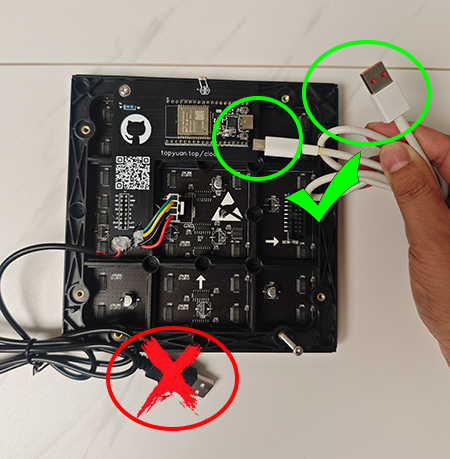
If you don't want to update manually, the current older version will continue to be available, but there will be no more OTA updates for new watch faces, features, etc




I strongly recommend that you update. The new version has added the following clockfaces and is continuously being updated via OTA.
Why
The ESP32 contains a partition table that divides the chip space into different regions. During OTA updates, only the app region can be updated, the partition table cannot be rewritten
The older version used the default partition table, with the clock program running in app0 or app1. Both partitions were the same size, approximately 1310KB. Each time an update was pushed, the data was automatically written to the other partition and the system restarted
The current version v3.24 has reached 1304KB
The new version redesigns the partition table. The clock program runs in app1, which is approximately 3014KB. Each time an update is pushed, it automatically restarts in app0. app0 only contains a rewritten update program, approximately 1MB, which is only used during updates

There is still plenty of space available for OTA updates under the new version's partition table
Thanks
Thank you for using this project, and I hope you enjoy it!